
PDM, PLM and CAD Management for UK Engineering Teams
You're frustrated with constant rework and inconsistencies that plague your design process. It slows down engineers and creates downstream errors that cost manufacturing time and resources. We help CAD leaders build an environment where every engineer trusts the data, versions are clear, and the focus shifts to design excellence.
What Falls On Your Desk
The day-to-day tasks that define the CAD Manager's role and where better tooling makes the biggest difference

CAD Standards & Libraries
Establishing and maintaining CAD standards, best practices, managing libraries and templates in the organisation

Version Control & Data Integrity
Ensuring proper version control for design files, maintaining data integrity, and managing CAD software licences and updates

Data Exchange & Integration
Facilitating data exchange with other engineering tools (CAE, CAM, ECAD) and ensuring consistent product data

Training & Technical Support
Providing technical support and training to CAD users, leading the CAD team, and driving adoption of best practices
Pains Holding You Back
The friction CAD leaders face when design data is fragmented and processes rely on manual coordination
Inconsistent Versions
Collaboration Gaps
From CAD Files to Connected Product Data
See how leading manufacturers have transformed their design data environment — from fragmented files to a connected product data backbone that supports every stage of the product lifecycle.
PLM Guide -->
Gains You Could Achieve
Transform CAD data pains into competitive advantages that accelerate product development
-
 Single source of truth for design data
 -
Automated version control
-
Enhanced data integrity and traceability
-
Faster time-to-market
-
Reduced training time by 60%
-
Clear approval and release processes
Collaboration
-
Better data exchange
-
Shared product definition
-
Reduced integration & design redesigns
A PLM Engineers Can Trust
We help CAD Managers move from firefighting data problems to driving design quality. With centralised product data management and automated version control, your team spends less time searching for files and more time innovating.
Key Roadmap Steps
Questions CAD leaders ask as they move from recognising the problem to choosing a solution
Problem
-
Why is our design process so inefficient and error-prone?
-
How do other companies manage complex CAD data and versions effectively?
-
What are the impacts of disconnected CAD systems on design quality and speed?
& Partners
-
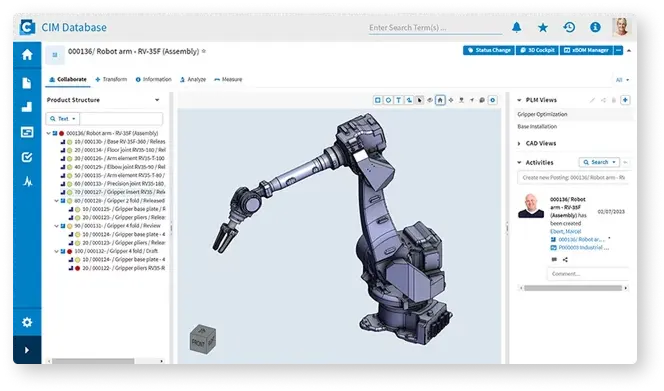
How can PLM improve CAD data management and version control?
-
What are the best practices for integrating CAD tools into a central product system?
-
Can PLM streamline our multi-disciplinary design collaboration?
Implementation
-
What does your solution implementation look like for CAD teams?
-
Can you provide references from companies with similar CAD challenges?
-
What training and support is available for our CAD engineers?
Our Approach to Help You Get There
A structured approach that moves CAD teams from firefighting to design excellence
FAQs
Questions CAD leaders ask when design data control and engineering efficiency become a priority
What does a Manager of CAD need from a PLM platform?

They typically need better control of design data, versions, release status, and engineering changes—together with stronger standards, automated version control, and easier collaboration across engineering teams.
How does PLM reduce design rework for CAD teams?
Rework reduces when engineers work from a centralised data environment with automated version control, eliminating fragmented files, inconsistent versions, and manual handoffs that cause downstream errors.
Can PLM support multi-disciplinary engineering teams?
Yes. A stronger product data backbone helps mechanical, electrical, and software teams work from a shared product definition, reducing cross-domain integration issues and improving collaboration.
How do you support CAD user adoption during implementation?
Adoption depends on practical training, sensible governance, and workflows that match how engineers actually work. We provide technical support, CAD library management guidance, and hands-on training for CAD users.